If you’re trying to figure out how to delete a business portfolio on Facebook, you’re probably staring at Meta Business Suite and wondering why the option is buried so deep. It isn’t hard once you land on the right screen, but Meta doesn’t put it front and center.
The bigger catch is access. You need to be signed into the Facebook account that already has permission to remove that portfolio, and if Meta detects a blocker, the delete request won’t go through. Here’s the clean path so you can delete the right thing without mixing it up with a Page or ad account.
Know what you’re deleting before you remove anything
A business portfolio is the main business container inside Meta Business Suite, or what a lot of people still call Facebook Business Manager. It can hold Pages, ad accounts, people, and permissions. Think of it as the outer shell. Your Page and your ad account might live inside it, but they are not the same thing. Same building, different room.
That matters because people often search for different things and land on the same menu. You might be looking up how to delete Facebook business portfolio, how to delete a Facebook business portfolio, or how to delete business portfolio on Meta. Those all point to the portfolio itself. But if your real goal is how to delete Facebook business account, how to delete a business account on Facebook, or how to delete ad account in Business Manager, you’re talking about a different action.
This quick view helps keep it straight:
That last one trips people up a lot. Searches like “Facebook business page delete” or “delete Facebook business page” are about the Page, not the business portfolio around it. The same goes for how to unlink business page from personal Facebook.
Before you do anything, sign in to the correct Facebook account. If you don’t have the right permissions, the delete button may never appear. If you also need to sort out who has control on the Page side, this guide to managing Facebook page roles can help you check access first.
How to delete a business portfolio on Facebook
Once you’re in the right account, the steps are short. The hard part is knowing where Meta hid them.
Open Ads Manager and choose the right portfolio
Start on Facebook and look at the left-side menu. Click See more, then choose Ads Manager. That opens the business tools area where the portfolios tied to your account can show up.
At that point, you should see the business portfolios connected to you. Read the names carefully before you click. If you manage a client account, an old store, and your current business, it’s easy to open the wrong one and start a Facebook business portfolio delete request on the wrong asset.
Go to Settings, then Business Info
Click the portfolio you want to remove. From inside that portfolio, open Settings. This takes you into the business settings area for that specific portfolio.
Next, click Business Info. That’s the section where Meta keeps the business details and the delete option. If you’ve been searching for how to delete business portfolio, how to delete business portfolio on Facebook, or “Facebook business portfolio delete” and not finding the right screen, this is usually the spot you were missing.
If your menu labels look a little different, that’s normal. Meta changes wording often, and some accounts still show older Business Manager style labels. The path is still the same idea. Meta’s own business portfolio deletion help page points to the same settings area.
Start the deletion request
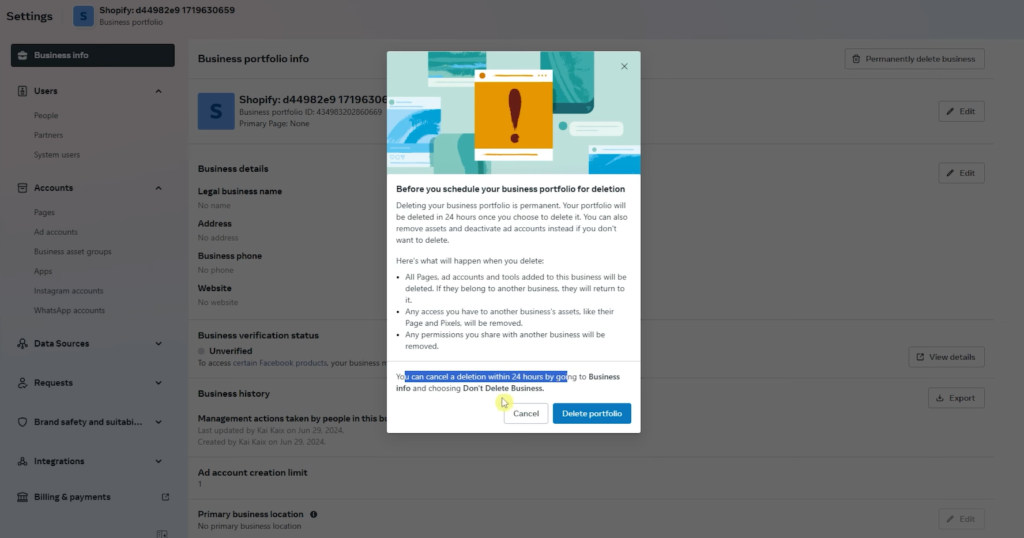
Inside Business Info, look for Permanently delete business. Click it, and Meta will show you a warning before anything is finalized.
Read that warning instead of blowing past it. You’re not hiding the portfolio or archiving it. You’re telling Meta to remove it. When you’re ready, click Delete portfolio. If nothing is blocking the request, you can continue by clicking Next, and the portfolio will be scheduled for deletion.
What happens after you click “Delete portfolio”
This part is easy to miss. Meta gives you a short grace period after you submit the request.
You have 24 hours to cancel the deletion.
If you change your mind, go back into Business Info during that window and use the cancel option, shown in the walkthrough as “Don’t Delete Business.” After that, you lose the quick undo route.
That 24-hour gap is why you should double-check the portfolio name before confirming. If you were really trying to remove business portfolio access on Facebook, remove business portfolio from Facebook page, or remove business portfolio access from Facebook page, full deletion is a much bigger move than you need.
Can’t delete business portfolio Facebook? Here’s what usually stops it
If Meta tells you the portfolio can’t be deleted yet, the steps aren’t wrong. Something in the account is blocking the request.
In the walkthrough, Meta shows a message that issues need to be resolved first. That’s why people search can’t delete business portfolio Facebook, cannot delete Facebook business account, or how to delete restricted business manager and still get stuck. The blocker depends on the account, so you need to check what Meta is flagging on your screen.
In plain terms, the portfolio still has something attached to it or some issue that needs attention before deletion can happen. If you’re trying to delete Facebook Business Manager while connected assets or account problems are still active, Meta may refuse to move forward.
If you don’t even see the delete option, check the basics first. Make sure you’re signed into the correct Facebook profile, and make sure that profile has permission to manage that business portfolio. No access means no delete button.
Once you’ve fixed whatever Meta is blocking, go back to the same deletion prompt, click Next, and schedule it again.
The mix-ups that waste the most time
The most common mistake is treating the Page, the ad account, and the portfolio like one thing. They aren’t. If your real goal is how to delete a business page on Facebook, how to delete a Facebook business page, or how to unlink business page from personal Facebook, portfolio deletion is the wrong tool for the job.
Another easy mix-up is assuming the request failed because the portfolio still appears right after you submit it. Meta schedules the deletion first. It does not always disappear on the spot.
After the 24-hour window passes, open Ads Manager again and check the list of portfolios tied to your account. If the one you deleted is gone, the removal went through. If it’s still there and Meta is still showing a blocker, go back into Business Info and check the status before trying the same steps again.
Once it’s scheduled, you’re mostly done
If you want to delete a business portfolio on Facebook, the path is simple once you know where to go: open Ads Manager, choose the portfolio, open Settings, go to Business Info, then submit the delete request. The part that usually slows you down is access, or a blocker Meta wants fixed first.
Keep the 24-hour cancel window in mind, and make sure you’re deleting the portfolio you actually mean to remove. If Meta accepts the request and no issues are left hanging, you’re done with the hard part.
Frequently Asked Questions
Quick answers to common questions people ask before deleting a business portfolio on Facebook.
Want To Learn How to Add Admin on Facebook Page. Here’s a Step-by-Step Guide Article on how to do so.