
Losing access to your Instagram account feels stressful and unfair, especially when it happens suddenly. Maybe you logged in and saw that dreaded message saying, “We suspended your account.” Or you’re worried your account got banned, disabled, or even deleted by mistake. Don’t panic. You can recover disabled Instagram account with the right steps, a calm head, and a little patience.
This guide shows you exactly how to restore a disabled Instagram account, appeal the decision, and increase your chances of getting your profile back—whether it was an honest mistake or a misunderstanding. If you’re searching for how to recover a disabled Instagram account, how to fix a ban, or how to start an Instagram account appeal, you’re in the right spot. This article will detail how to recover a disabled Instagram account effectively.
Why Instagram Disables Accounts and What That Means for You
Instagram disables or restricts accounts for many reasons. Sometimes it’s because they believe you violated their guidelines, posted copyrighted content, or engaged in behavior that looks like spam. Sometimes mistakes happen.
When you try to log into a disabled Instagram account, you’ll see a notice. It usually says, “We suspended your account,” and it outlines your options. Most people get 180 days (about six months) to appeal the decision. If you let that window close, you lose your chance.
Understanding why your account was disabled is critical. Instagram expects you to know the reason and reference it in your appeal. Was it a copyright issue? Too many follows and unfollows? If you’re not sure, review your recent activity and Instagram’s community guidelines.
How to Recover a Disabled Instagram Account: Step-by-Step Tutorial
Follow this checklist to maximize your chances of recovering a disabled Instagram account. Stay calm. Even if Instagram says your ban is permanent, an appeal often works if you make your case politely and accurately.
1. Log In and Read the Suspension Notice
- Go to Instagram and try to log in as usual.
- When you see the suspension notice, carefully read what Instagram says.
- Pay attention to the reason—or suspected reason—for your account being disabled.
Pro tip: If it’s unclear why your account was disabled, consider any recent changes, posts, or actions you’ve taken. Every detail helps when appealing.
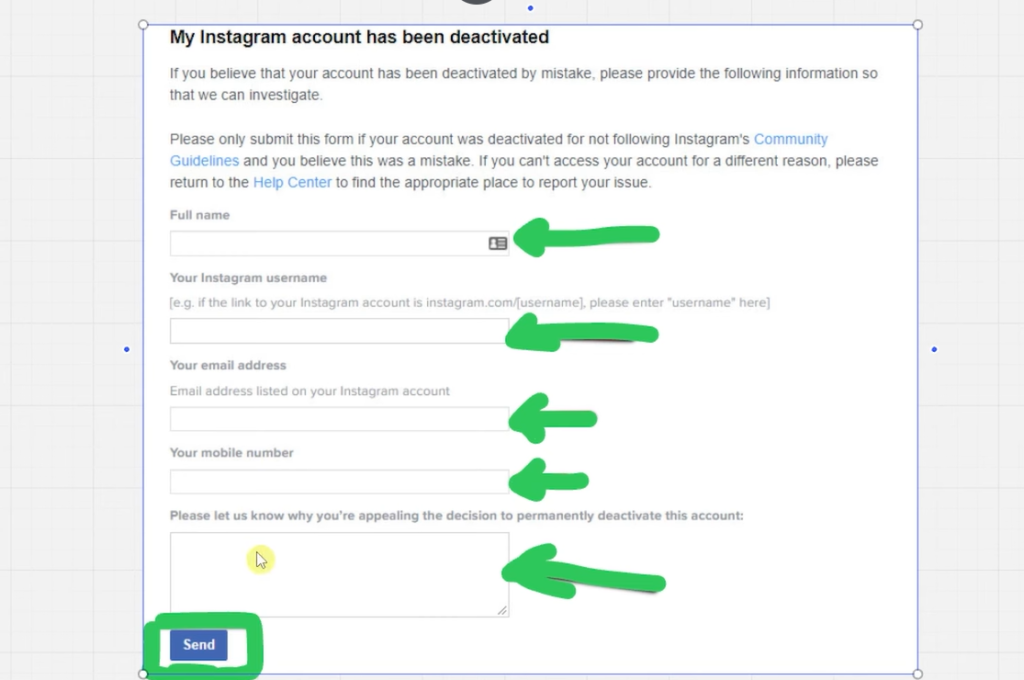
2. Submit an Appeal Using Instagram’s Built-In Form
Right below the suspension message, you’ll see buttons to Disagree with Decision or Appeal. This is your direct link to reinstating your account. Click it to start the official Instagram appeal form.
What You’ll Need for the Instagram Account Disabled Appeal:
- Full Legal Name: Use the name connected to your Instagram. If you have Meta verification, make sure it matches exactly.
- Instagram Username: Double-check for typos.
- Email Address: It must be the email tied to the disabled Instagram account. Instagram uses this email to update you about your appeal.
- Phone Number: Add your current mobile number.
- Appeal Statement: This is your chance to explain why your account should be reactivated.
3. Write a Clear and Polite Appeal Statement
Don’t make your appeal too long. Keep it straightforward and polite. Don’t blame Instagram or lash out. A good statement includes:
- A brief intro (say hello)
- A clear statement that your account was disabled, and you believe it was a mistake
- A short explanation—mention if you think the system misunderstood your activity or if your account was hacked, for example
- Request that Instagram review and reactivates your account
- Give thanks and sign off politely
Example Appeal Statement
Hi Instagram Team,
I noticed my account was disabled but I believe this was a mistake. I always try to follow your community guidelines. If any of my recent activity looked suspicious, I’d be happy to clarify. Please review my case and consider reactivating my account. Thank you for your help.
Regards,
[Your Name]
4. Submit the Instagram Appeal Form
After filling out the form and double-checking your info, hit “Send.” You’ll see a confirmation message: your appeal has been submitted.
5. Wait for Instagram’s Response
Instagram typically reviews appeals within a day, sometimes less. In some cases, people receive a result within a few hours. You’ll get a decision via email.
What Happens Next?
- If your appeal is successful, Instagram reactivates your account, and you’ll regain full access. Check for an email confirming the recovery.
- If your appeal is denied: Read the email. It may explain why, or you could try to appeal again if allowed.
Tips to Successfully Recover an Instagram Account and Avoid Mistakes
Saving your account is about being prepared and following a smart process. Keep these tips in mind:
- Use the same email and phone number registered to your Instagram. Don’t switch to a different email.
- Don’t overexplain or get emotional. Stick to the facts.
- Don’t submit many appeals rapidly. Wait for a response before trying again.
- Always check your email spam or junk folders for Instagram’s reply.
- Keep records of your appeal and communication. You might need to reference this later.
If you often use Instagram for business or content creation, consider regularly backing up important posts, messages, and contacts. Prevention saves headaches.
What You’ll See When Instagram Reactivates Your Account
If Instagram agrees with your appeal, you’ll get an email that looks something like this:
“Your Instagram account was disabled as a mistake. Your account has been reactivated.”
After this, try logging in again. Your account and data should be restored to their previous state.
If you receive this message, you’re back in – congrats!
How to Prevent Instagram Account Disabling in the Future
- Review Instagram’s Community Guidelines and Terms of Service often.
- Avoid repetitive, spammy behavior (like mass liking, commenting, or following/unfollowing).
- Don’t use suspicious third-party apps that promise fake followers or likes.
- Monitor your content for copyrighted material or anything risky.
- Secure your login details and enable two-factor authentication.
Protect your account like your digital home base.
Alternative Solutions If Instagram Rejection Persists
Not every appeal works. If you get denied several times and believe your account loss is a mistake:
- Visit the Instagram Help Center for updated recovery options.
- If you run a business or creator account, consider reaching out to business support through Facebook or Meta.
- Recreate a new account with fresh information if recovery is impossible (not recommended unless you’ve tried everything).
- Back up your content and build a habit of saving important work to cloud storage.
Conclusion: Start Your Instagram Account Recovery Journey Today
Getting disabled on Instagram feels like hitting a wall—but you don’t have to accept it. By sending a thoughtful, direct appeal using the Instagram appeal form, most users get a second chance. Remember to stay calm, use the exact email address and account details, and keep your explanation polite and concise. If you follow these steps, you significantly increase your chances of recovering your Instagram account.
A disabled Instagram account is more common than you think, and most suspensions are reversible. Take action now. Appeal within 180 days, use the best practices outlined here, and get back to sharing your moments with friends and followers. If you want to keep your Instagram access safe, make backups, and learn about features that support content creators. You have the knowledge—now put it to work and get your Instagram back where it belongs: in your hands.
Remember: Your voice matters on Instagram. Don’t give up on account recovery. You’re just a few steps away from reclaiming your account and community.
Prefer Visual Help? Watch the Step-by-Step Video Guide!
Struggling on how to recover a disabled Instagram account? Don’t worry—this video breaks it down step by step with clear, hands-on instructions. If you want the only working method that actually gets results, this video is for you!
▶ Watch TutorialCommon Questions About Instagram Account Disabled Appeal and Recovery
Looking for more Instagram tutorials? Check out guides on topics like how to schedule Instagram posts directly from your PC to save time and keep your profile active even when you’re offline.


![How To Apply For A Paypal Credit Card Getting A Paypal Credit Card Isn'T Hard. What Trips Most People Up Is Knowing Where To Find The Application, What Details To Enter, And What Happens After You Submit It. If You'Re Trying To Figure Out How To Apply For A Paypal Credit Card Online, The Whole Process Starts Inside Your Existing Paypal Account. Once You Know Where To Look, It Feels A Lot More Straightforward. Start Inside Your Paypal Account You Need An Active Paypal Account Before You Can Start A Paypal Credit Card Sign Up. Open The Paypal App Or Log In On The Website, Then Look For The Credit Or Card Section In Your Dashboard. That'S Where The Application Starts. If You'Re Checking Out The Paypal Credit Card In 2025, There'S One Detail Worth Catching Early Paypal Has More Than One Credit Product. The Card Option And The Paypal Credit Digital Line Are Different, And Paypal Explains That On Its Credit Card Vs. Paypal Credit Help Page [Httpswww.paypal.comuscshelparticlewhat-Is-The-Difference-Between-Paypal-Credit-Card-And-Paypal-Credit-Digital-Line-Help472]. Where To Find The Application The Path Is Usually Short On The Website, Sign In And Look For Paypal Credit, Wallet, Or A Card-Related Section. In The App, Sign In And Check The Area Where Paypal Shows Cards, Credit, Or Other Financial Products. When You See Apply Now, You'Re In The Right Place. If Your Account Shows An Option To Apply For Paypal Mastercard, The Paypal Mastercard Application Follows The Same Basic Path Log In, Open The Offer, And Start The Form. Fill Out The Paypal Credit Card Application Carefully Once You Click Or Tap Apply Now, You'Ll Be Taken To The Official Form. This Is The Part Where The Paypal Credit Card Requirements Matter Most. Have These Details Ready Before You Begin Your Full Legal Name Your Current Residential Address Your Social Security Number Your Income Details Paypal'S Own Cashback Mastercard Application Help Page [Httpswww.paypal.comuscshelparticlehow-Do-I-Apply-For-A-Paypal-Cashback-Mastercard-Help753] Says You May Be Asked To Confirm Personal Details And Income In The App Or On The Website. So Don'T Rush Through It. A Typo In Your Address, Name, Or Income Can Slow Down Your Paypal Credit Card Approval Or Lead To A Follow-Up Request. Before You Submit, Read The Terms And Conditions Carefully. Look At The Interest Rate, Any Annual Or Late Fees, And The Rewards Or Financing Details Attached To The Offer. If You'Re Wondering Whether It'S Worth It, This Is The Part That Gives You The Real Answer. What Happens After You Submit After You Send In The Paypal Credit Card Application, Paypal Performs A Credit Review. That'S Normal When You Apply For A Paypal Credit Card Online. You May Get One Of Three Outcomes Almost Right Away Approved, Declined, Or Asked To Provide More Information. If More Details Are Requested, Keep Everything Inside The Official Paypal App Or Site. That'S The Safest Way To Continue. A Fast Decision Is Possible, But Quick Paypal Credit Approval Isn'T The Same Thing As Automatic Approval. If You'Re Searching For A Magic Paypal Credit Card Credit Score Number, There Isn'T A Public Cutoff Listed In The Materials Here. So There Isn'T A Guaranteed Score That Leads To Paypal Credit Card Approval. Your Paypal Credit Approval Depends On The Lender'S Review Of The Information You Submit. This Is Also Where People Mix Up Products. A Paypal Debit Card Is Different From A Paypal Credit Card, And Moving Balance Between Gcash And Paypal [Httpshowtoishtutorial.comsend-Money-From-Gcash-To-Paypal] Is A Money-Transfer Process, Not Part Of A Card Application. What Happens Once You'Re Approved Once Approved, Your Account Is Linked So You Can Manage It From Paypal. If A Physical Card Is Part Of Your Approval, It Will Be Sent By Mail. After That, You Can Use It For Online Purchases, In-Store Transactions, And Any Financing Options Attached To The Account. That'S The Biggest Convenience Here. You Can Track Spending, View The Card, And Manage Payments From The Same Paypal Account You Already Use. No Extra Guesswork, No Hunting Around For A Separate Setup. For Online Checkout, The Benefit Is Obvious. The Card Works With Paypal'S Payment Flow, Which Makes It Easy To Use. In Stores, It Works Like A Regular Card. If Your Offer Includes Payment Flexibility, You Can Keep An Eye On That From Your Existing Dashboard. Final Thoughts Applying For A Paypal Credit Card Comes Down To A Few Simple Moves Log In, Find The Credit Section, Complete The Form, Review The Terms, And Wait For The Decision. If You Want The Process To Go Smoothly, Accuracy Matters More Than Speed. Get Your Details Right The First Time, And The Whole Thing Feels A Lot Less Intimidating.](https://howtoishtutorial.com/wp-content/uploads/2026/05/How-to-Apply-for-a-PayPal-Credit-Card-720x471.jpg "How To Apply For A Paypal Credit Card 7")