Switching back to a personal account on Instagram is easier than you might think, and it could help simplify your experience in a big way. Maybe you made your profile a business account for the insights or extra tools, but now you want your personal Instagram account back. Whether it’s for privacy, fewer notifications, or just making things less complicated, you can switch to personal account on Instagram in just a few taps. Follow this clear Instagram tutorial, and you’ll be back to a personal account in minutes—no tech expertise required. This guide will show you how to switch back to a personal account on Instagram seamlessly. Learn how to switch back to a personal account on Instagram!
Why You Might Want to Switch Back to Instagram Personal Account
Do you feel overwhelmed with business notifications or analytics you hardly use? Business and professional accounts are great for creators, small businesses, or influencers who need extra tools to manage campaign insights or advertising. But if you’re not using those tools, they can get in the way.
Switching back to a personal account on Instagram can:
- Restore a clean, simple profile without the extra business features.
- Give you more privacy and control over who sees your posts.
- Allow you to make your Instagram account private again.
- Stop alerts or recommendations tailored to businesses.
Quick Overview: Instagram Account Types
If you aren’t selling products or focusing on content strategy, switching to personal account on Instagram is usually best.
How to Switch Back to Personal Account on Instagram: Step-by-Step
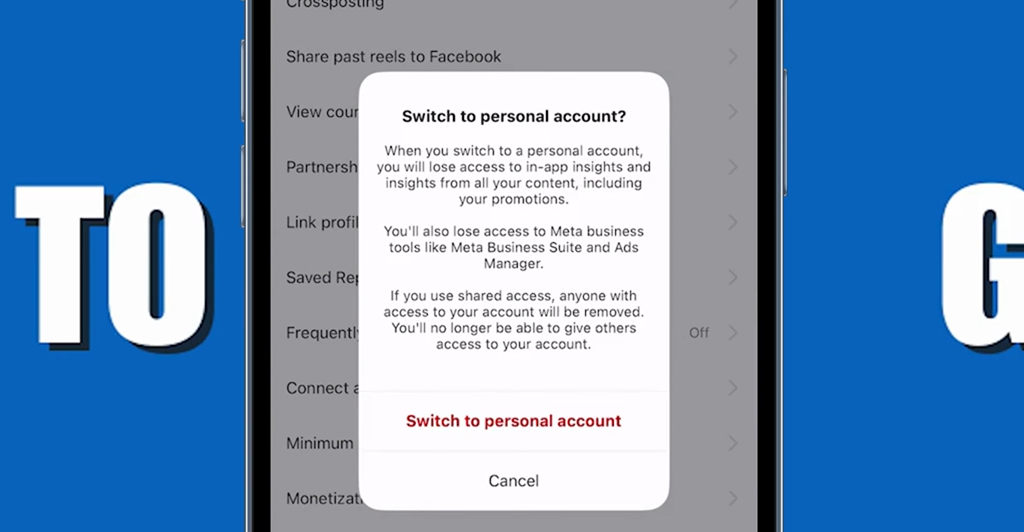
Follow these simple instructions, and you’ll switch your Instagram account from business or creator to personal in no time.
1. Open Your Instagram Profile
Start by opening the Instagram app. Make sure you’re logged into the account you want to change.
2. Go to Account Settings
- Head to your profile by tapping your display picture in the bottom-right corner.
- In the top-right corner of the screen, find and tap the three horizontal bars (sometimes called the hamburger menu).
3. Access Business Tools and Controls
- Scroll down and look for the section labeled For Professionals.
- Tap Business Tools and Controls. The exact wording might change in future updates, but look for a section that mentions “business” or “professional.”
4. Tap “Switch Account Type”
- Inside Business Tools and Controls, tap on Switch Account Type.
- A pop-up or new screen should appear with a few options: switch to personal account, switch to creator account, or similar.
5. Select “Switch to Personal Account”
- Tap Switch to Personal Account (usually found at the bottom).
- Confirm your choice if prompted.
After you do this, your profile will go back to a standard Instagram personal account. The professional dashboard disappears, along with analytics, business info, and extra contact buttons.
What Happens After Switching?
Switching back to personal account on Instagram is safe. Here’s what changes, and what doesn’t:
- You keep all your followers, posts, and DMs.
- Your account can be set to private if you want.
- Professional tools (insights, promotions, ads) will no longer be available.
- Your business info (phone, email, address) will disappear from your profile.
- Your profile will look like a regular Instagram user again.
Good to know: Switching is reversible. You can always convert your profile to a business or creator account again later if you change your mind.
Who Should Switch Back to Personal Account on Instagram?
Ask yourself these questions:
- Do you miss the privacy settings of a regular account?
- Are you tired of business-related notifications?
- Do you want to hide your contact info from public view?
- Were you just testing business tools, but don’t use them anymore?
If you answered yes to any of these, switching back to a personal Instagram account will simplify your experience.
Troubleshooting: Can’t Find the Option to Switch?
Rarely, the option to switch may seem missing. Here’s what to try:
- Make sure you’re using the latest version of Instagram.
- Double-check you’re in the correct app section (under account settings or business controls).
- Log out and back in, or restart your phone.
- If you have many linked Facebook features, try disconnecting them first.
For persistent problems, Instagram’s help center can walk you through it, or you can reinstall the app as a last resort.
Tips for a Smoother Switch to Instagram Personal Account
- Back up important business insights if you need stats later. You lose access to analytics after switching.
- Adjust your privacy settings and check your content share preferences for extra peace of mind.
- If managing multiple accounts, repeat the steps for each one.
Final Thoughts: Make Instagram Work for You
Changing your account settings doesn’t need to be confusing. With these easy steps, you know how to switch back to personal account on Instagram—no extra apps or technical knowledge required. Go ahead, take control, and enjoy a more private and streamlined Instagram experience!
If you’re interested in more Instagram tutorials, need help recovering disabled or lost access to your account, or want to disable similar account suggestions, keep following this digital DIY guide series from Tech Is Easy. Remember: the best type of Instagram account is the one that fits your needs today.
Ready to reclaim your Instagram personal account? Open your app, follow the directions, and simplify your social experience in minutes.
Prefer Visual Help? Watch the Step-by-Step Video Guide!
Struggling on how to switch back to personal account on Instagram? Don’t worry—this video breaks it down step by step with clear, hands-on instructions. If you want the only working method that actually gets results, this video is for you!
▶ Watch Video TutorialFrequently Asked Questions (FAQs)
Looking for other helpful Instagram tutorials? You might enjoy the Guide to unarchiving Instagram stories or our guide on how to reply to comments on Instagram Story.