How To Ish

Simple, Step-by-Step Tutorials for Everyday Tasks

  • Home
  • How-To Guides
    • Social Media How-To
      • YouTube How-To
      • Instagram How-To
      • Facebook How-To
      • X (Twitter) How-To
      • Telegram How-To
      • Pinterest How-To
      • Snapchat How-To
      • TikTok How-To
      • Discord How-To
    • Video Editing Software How-To
      • CapCut How-To
      • DaVinci Resolve How-To
      • Premiere Pro How-To
      • Descript How-To
    • Finance Platform How-To
      • QuickBooks How-To
      • PayPal How-To
      • Zelle How-To
      • Wise How-To
      • Stripe How-To
Menu
Expand search form

PayPal How-To

How to Transfer Money From PayPal to PayPal

09/05/2026
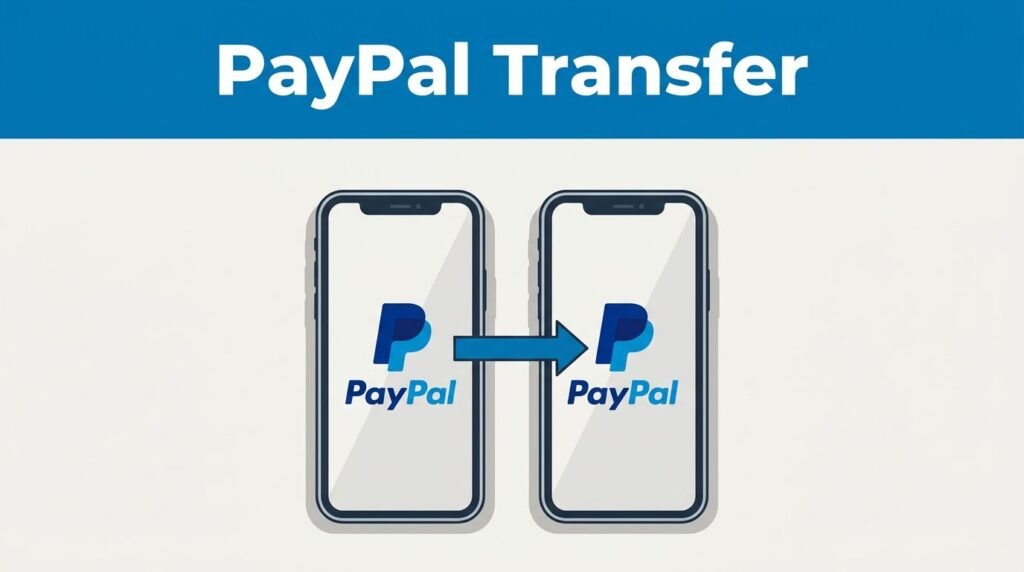
Paypal To Paypal Transfer
How to transfer money from paypal to paypal 3

Sending money to another PayPal account is quick, but the details matter. If you’ve been trying to figure out how to transfer money from PayPal to PayPal, you don’t need a long setup or a separate service.

You can do the whole thing from PayPal’s website or app, choose your currency, pick the right payment type, and send the money in minutes. Here’s the clean version, without the guesswork.

Table of Contents

Toggle
  • How a PayPal to PayPal transfer works
  • How to send money from PayPal to another PayPal account
  • Choose the right payment type before you send
  • A few things people mix up with this process
  • Final thoughts
  • Prefer Visual Help? Watch the Step-by-Step Video Guide!
  • Frequently Asked Questions

How a PayPal to PayPal transfer works

A PayPal to PayPal transfer is exactly what it sounds like, you’re sending money from your account straight to someone else’s PayPal account. That makes it one of the easier ways to handle a PayPal money transfer, especially if both of you already use the platform.

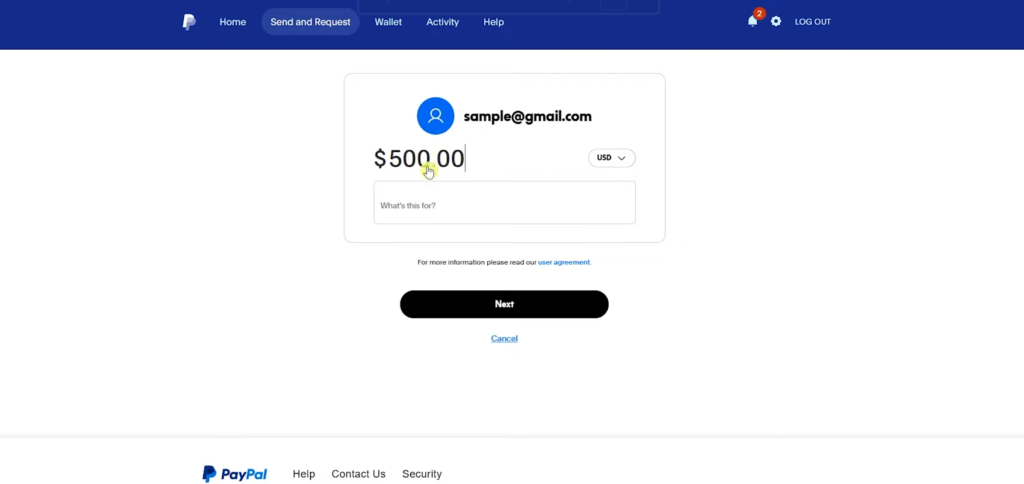
You can start from paypal.com or the mobile app. In either place, the flow is about the same: open “Send & Request,” enter the recipient, type the amount, choose the payment type, and confirm how you want to pay. If you want the official version of how to send money on PayPal, PayPal lays it out on its send money help page.

How to send money from PayPal to another PayPal account
How To Transfer Money From Paypal To Paypal
How to transfer money from paypal to paypal 4

If you’re looking for a beginner-friendly PayPal tutorial, this is the part that matters most.

  1. Log in to your PayPal account on the website or in the app, then open Send & Request.
  2. Enter the recipient’s details. You can use their name, username, email, or mobile number. If you’ve sent money to them before, the name or username can be easy to spot. If you haven’t, email is the safer choice.

If you’re not fully sure which account is theirs, use the email address instead of guessing from a similar name.

  1. Enter the amount you want to send. You can also change the currency before moving on. If you’re sending in a different currency than the one in your balance, PayPal shows the conversion, including how much you’re sending and how much the recipient should receive.
  2. Add a note if you want. This part is optional, so you can leave it blank if there’s nothing to explain.
  3. Hit Next and choose the payment type. This is where people pause, and for good reason.

Choose the right payment type before you send

This choice matters more than it looks:

Payment type Best used for Protection
Goods and Services Paying for work, items, or services Buyer protection applies
Friends and Family Personal transfers to people you trust No buyer protection

If you’re paying someone for a service or product, choose Goods and Services. If you’re sending money to a friend or relative, Friends and Family fits better. The tradeoff is simple, Friends and Family does not include buyer protection, so you usually wouldn’t use it for a purchase.

After that, pick how you want to pay. You can use your PayPal balance, cards, or other payment methods already connected to your account. That’s also part of how to use PayPal without bank account, because a linked bank isn’t the only funding option shown during checkout.

Once you review everything and send it, the transfer is typically processed right away because it’s PayPal to PayPal.

A few things people mix up with this process

This guide is about how to send money from PayPal to PayPal account, not how to withdraw money from PayPal to bank account. That’s a different path inside your account.

If you need a PayPal to bank account transfer, PayPal’s official withdrawal instructions show the bank route through Wallet and Transfer Money. That’s the process for how to transfer money from PayPal to bank account, or transfer money from PayPal to bank account after you’ve received funds.

The short version is this: a PayPal guide for sending money to another person starts in Send & Request, while a PayPal to bank account move starts in Wallet. Once you know the difference, how to use PayPal gets a lot less confusing.

Final thoughts

If you want the fastest answer to how to send money on PayPal, open Send & Request, enter the right recipient, check the amount and currency, then choose the payment type carefully.

That’s the part most people rush, and it’s the part you shouldn’t. Get that right, pick your funding method, and your PayPal to PayPal transfer should be on its way almost instantly.

Prefer Visual Help? Watch the Step-by-Step Video Guide!

Struggling with How to Transfer Money From PayPal to PayPal? Don’t worry—this video breaks it down step by step with clear, hands-on instructions. If you want the only working method that actually gets results, this video is for you!

▶ Watch Tutorial

Frequently Asked Questions

1 How do you send money from one PayPal account to another?

Log in to PayPal on the website or app, open Send & Request, enter the recipient’s name, username, email, or mobile number, type the amount, choose the payment type, pick your funding method, and confirm the transfer.

2 What is the difference between Goods and Services and Friends and Family?

Goods and Services is meant for paying for products or services and includes buyer protection. Friends and Family is for personal transfers to people you trust and does not include buyer protection.

3 Can you send money from PayPal without linking a bank account?

Yes. You can often fund the payment using your PayPal balance, cards, or other payment methods already connected to your account, so a linked bank account is not always required.

4 Is sending money to another PayPal account the same as withdrawing to a bank?

No. Sending money to another PayPal account starts in Send & Request. Withdrawing money to a bank account is a different process that usually starts in Wallet and then Transfer Money.

5 How fast is a PayPal to PayPal transfer?

In most cases, a PayPal to PayPal transfer is processed right away or very quickly once you review the details and send the payment.

Want to learn How to Apply for PayPal Credit Card? Here’s a Step-by-Step Guide Article on how to do so.

Account SecurityFees & LimitsFind or Access SomethingSending MoneyTroubleshooting
Previous Post Next Post

Related Tutorials

26/07/2026
How To Save Video From Telegram To Iphone Gallery

How to Save Video from Telegram to iPhone Gallery

20/05/2026
How To Redeem Paypal Reward Points

How to Redeem PayPal Reward Points (Simple Guide)

27/05/2026
How To Remove Facebook Dating Shortcut From The App

How to Remove Facebook Dating Shortcut from the App

About

Hi, I’m Ashley J. I make complex tools easy to understand by creating simple, practical guides you can use.

XOXO

Elsewhere
HowToish Logo

HowToish

Step-by-step tutorials to help you solve everyday problems faster.

Subscribe on YouTube

Latest Posts

  • 22/08/2025
    How To Add Keyframe In Capcut Pc

    How to Add Keyframe in CapCut PC

  • 18/05/2026
    How To Apply For A Paypal Credit Card Getting A Paypal Credit Card Isn'T Hard. What Trips Most People Up Is Knowing Where To Find The Application, What Details To Enter, And What Happens After You Submit It. If You'Re Trying To Figure Out How To Apply For A Paypal Credit Card Online, The Whole Process Starts Inside Your Existing Paypal Account. Once You Know Where To Look, It Feels A Lot More Straightforward. Start Inside Your Paypal Account You Need An Active Paypal Account Before You Can Start A Paypal Credit Card Sign Up. Open The Paypal App Or Log In On The Website, Then Look For The Credit Or Card Section In Your Dashboard. That'S Where The Application Starts. If You'Re Checking Out The Paypal Credit Card In 2025, There'S One Detail Worth Catching Early Paypal Has More Than One Credit Product. The Card Option And The Paypal Credit Digital Line Are Different, And Paypal Explains That On Its Credit Card Vs. Paypal Credit Help Page [Httpswww.paypal.comuscshelparticlewhat-Is-The-Difference-Between-Paypal-Credit-Card-And-Paypal-Credit-Digital-Line-Help472]. Where To Find The Application The Path Is Usually Short On The Website, Sign In And Look For Paypal Credit, Wallet, Or A Card-Related Section. In The App, Sign In And Check The Area Where Paypal Shows Cards, Credit, Or Other Financial Products. When You See Apply Now, You'Re In The Right Place. If Your Account Shows An Option To Apply For Paypal Mastercard, The Paypal Mastercard Application Follows The Same Basic Path Log In, Open The Offer, And Start The Form. Fill Out The Paypal Credit Card Application Carefully Once You Click Or Tap Apply Now, You'Ll Be Taken To The Official Form. This Is The Part Where The Paypal Credit Card Requirements Matter Most. Have These Details Ready Before You Begin Your Full Legal Name Your Current Residential Address Your Social Security Number Your Income Details Paypal'S Own Cashback Mastercard Application Help Page [Httpswww.paypal.comuscshelparticlehow-Do-I-Apply-For-A-Paypal-Cashback-Mastercard-Help753] Says You May Be Asked To Confirm Personal Details And Income In The App Or On The Website. So Don'T Rush Through It. A Typo In Your Address, Name, Or Income Can Slow Down Your Paypal Credit Card Approval Or Lead To A Follow-Up Request. Before You Submit, Read The Terms And Conditions Carefully. Look At The Interest Rate, Any Annual Or Late Fees, And The Rewards Or Financing Details Attached To The Offer. If You'Re Wondering Whether It'S Worth It, This Is The Part That Gives You The Real Answer. What Happens After You Submit After You Send In The Paypal Credit Card Application, Paypal Performs A Credit Review. That'S Normal When You Apply For A Paypal Credit Card Online. You May Get One Of Three Outcomes Almost Right Away Approved, Declined, Or Asked To Provide More Information. If More Details Are Requested, Keep Everything Inside The Official Paypal App Or Site. That'S The Safest Way To Continue. A Fast Decision Is Possible, But Quick Paypal Credit Approval Isn'T The Same Thing As Automatic Approval. If You'Re Searching For A Magic Paypal Credit Card Credit Score Number, There Isn'T A Public Cutoff Listed In The Materials Here. So There Isn'T A Guaranteed Score That Leads To Paypal Credit Card Approval. Your Paypal Credit Approval Depends On The Lender'S Review Of The Information You Submit. This Is Also Where People Mix Up Products. A Paypal Debit Card Is Different From A Paypal Credit Card, And Moving Balance Between Gcash And Paypal [Httpshowtoishtutorial.comsend-Money-From-Gcash-To-Paypal] Is A Money-Transfer Process, Not Part Of A Card Application. What Happens Once You'Re Approved Once Approved, Your Account Is Linked So You Can Manage It From Paypal. If A Physical Card Is Part Of Your Approval, It Will Be Sent By Mail. After That, You Can Use It For Online Purchases, In-Store Transactions, And Any Financing Options Attached To The Account. That'S The Biggest Convenience Here. You Can Track Spending, View The Card, And Manage Payments From The Same Paypal Account You Already Use. No Extra Guesswork, No Hunting Around For A Separate Setup. For Online Checkout, The Benefit Is Obvious. The Card Works With Paypal'S Payment Flow, Which Makes It Easy To Use. In Stores, It Works Like A Regular Card. If Your Offer Includes Payment Flexibility, You Can Keep An Eye On That From Your Existing Dashboard. Final Thoughts Applying For A Paypal Credit Card Comes Down To A Few Simple Moves Log In, Find The Credit Section, Complete The Form, Review The Terms, And Wait For The Decision. If You Want The Process To Go Smoothly, Accuracy Matters More Than Speed. Get Your Details Right The First Time, And The Whole Thing Feels A Lot Less Intimidating.

    How to Apply for a PayPal Credit Card

  • 03/07/2026
    How To Remove Background In Davinci Resolve

    How to Remove Background in DaVinci Resolve With Magic Mask

  • 10/06/2026
    How To Unsave Pins On Pinterest - Delete A Pin

    How to Unsave Pins on Pinterest and Remove Saved Pins

  • 05/09/2025
    How To Hide Your Following List On Instagram

    How to Hide Your Following List on Instagram

My Newsletter

  • Privacy Policy
  • About Us
  • Contact Us
  • Disclaimer
  • Terms & Conditions

How To Ish

© 2026 How-to-Ish Tutorials. All rights reserved. Tutorials, guides, and resources to help you get things done.

Close Menu