
Trying to figure out how to unblock someone on X? The fix is tucked inside your blocked accounts list, and once you know where that list lives, the whole thing takes less than a minute.
This works on the X app and on the website, so you can do it from iPhone, Android, or desktop. After you confirm the change, that person can see your profile, view your posts, and interact with you again. Here’s the cleanest way to get it done.
What unblocking someone on X actually does
Blocking cuts off visibility and interaction. When you remove that block, you reopen the door. The account you unblock can go back to seeing your profile, reading your posts, and engaging with your content.
If you’re looking up how to unblock people on X, how to unblock people on Twitter, or how to unblock a person on Twitter after the platform rename, you’re handling the same setting. X still keeps blocked accounts in one place, and that’s where you reverse it.
A few common reasons to do this:
- You blocked someone a while ago and changed your mind.
- You want to see their posts again.
- You need to message, reply, or follow them from your account.
- You’re cleaning out an old block list that got longer than you meant it to.
This is one of those settings that feels buried until you know the path. After that, unblocking on X is quick.
Before you open the blocked list
Start by making sure you’re signed into the right account. If you use more than one X profile, this is where people get tripped up most often. You can only manage the blocked list for the account you’re currently using.
The steps are the same whether you’re trying to learn how to unblock on X, how to unblock on X Twitter, how to unblock from Twitter, or how to unblock in Twitter. Open the app or site, tap your profile icon, and head into the privacy menu.
If you’re already cleaning up account settings while you’re there, you can also delete watch history on X from a nearby part of the same privacy area.
Make sure you open Blocked accounts, not Muted accounts. Those two options sit close together and are easy to mix up.
How to unblock someone on X
Open the settings menu
Open X and log in. On the app, tap your profile icon in the top corner. On desktop, open your account menu from the site.
From there, go to Settings and privacy. Next, tap Privacy and safety. This is the section where X keeps most of the controls for who can interact with you and what you can see.
If your screen looks a little different, don’t panic. Menu names can shift a bit between app versions, but Privacy and safety is still the place to look.
Find your blocked accounts list
Inside Privacy and safety, select Muted and blocked accounts. Then choose Blocked accounts. That opens the full list of people you’ve blocked in the past.

This is the screen you want if you’re trying to unblock an X account or remove block on X for someone specific. If your list is short, you’ll spot them fast. If it’s long, you’ll need to scroll and look for the right profile.
There isn’t always a separate unblock Twitter user search screen in this area, so don’t count on a search bar. Instead, check the exact name and unblock Twitter username carefully before you tap anything, especially if several accounts look similar.
Tap Unblock and confirm
Once you find the right person, tap the button next to their name. Depending on the version you’re using, it may show Blocked or Unblock. After you tap it, X asks you to confirm.
Tap Unblock again to finish. That’s the last step if you want to unblock someone on X, unblock on X for a past contact, or remove a block on X without opening their profile first.
If you’d rather do it another way, X also lets you visit the blocked person’s profile directly and unblock them there. The result is the same.
What happens right after you unblock
The change happens right away. Once you unblock someone on X, they can see your profile again, view your posts, and interact with your content like any other account that isn’t blocked.
If your goal was to unblock X so you could reconnect, that’s it. No extra save button. No waiting around for the setting to process.
You also keep control. If the interaction goes sideways again, you can block that person again from their profile page. So if you need to unblock a Twitter user now but want the option to re-block later, X makes that part easy too.
For readers who want the official wording straight from the platform, X keeps an updated blocking and unblocking help page.
If you can’t find the account, or your screen looks different
The steps are the same on Android, iPhone, and desktop
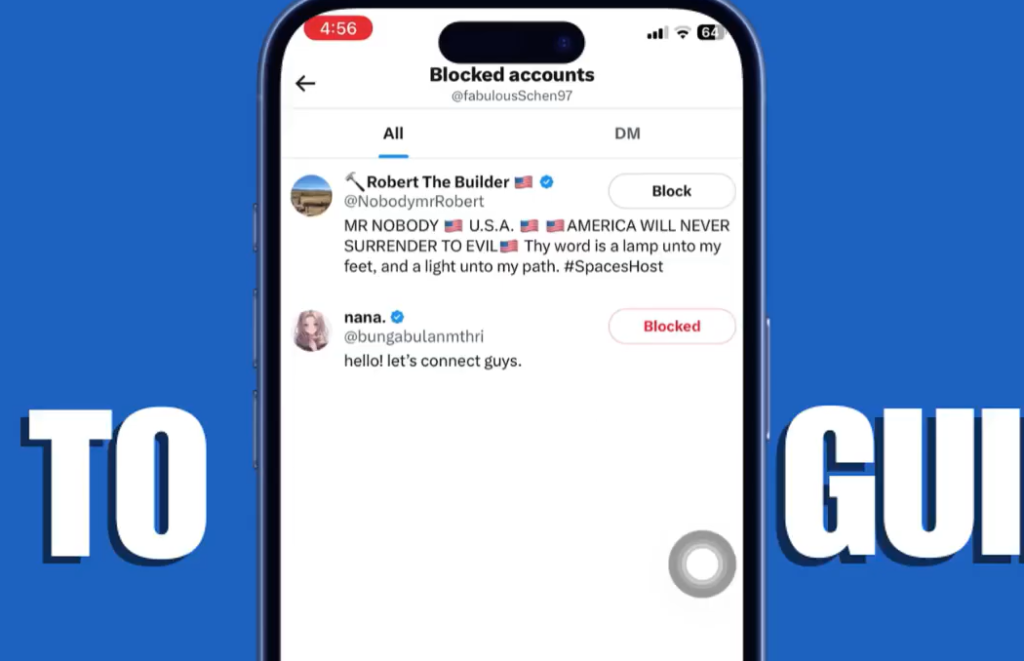
This process works the same way on Android, iPhone, and desktop. The layout may look wider on a computer, and buttons may sit in slightly different places, but the path is still your profile icon, Settings and privacy, Privacy and safety, then Muted and blocked accounts.
If a profile you expect to see isn’t there, check the basics first. Make sure you’re signed into the correct X account, refresh the app or reload the page, and confirm that you’re opening Blocked accounts instead of the muted list.
If you were searching for how to unblock a Twitter user, how to unblock Twitter username access, or an unblock Twitter user search option and kept coming up empty, the issue is usually the wrong account or the wrong menu, not the lack of an unblock button.
Don’t confuse unblocking with a locked account
A blocked user and a locked account are two different problems. Unblocking another person changes your relationship with that account. It does not fix a locked Twitter account or an X account locked for security, spam checks, or policy issues.
If what you really need is how to unlock X account access, how to unlock my X account, or help when your X account is locked, use X’s official locked and limited accounts help. That’s the right place to start if you need to unlock an X account on your side.
Small changes to the app happen over time, so labels or button placement may vary a bit. The path stays close to the same, even when the interface shifts.
Prefer Visual Help? Watch the Step-by-Step Video Guide!
Struggling with How to Unblock People on X? Don’t worry—this video breaks it down step by step with clear, hands-on instructions. If you want the only working method that actually gets results, this video is for you!
Watch TutorialFinal thoughts
Once you know where the blocked list lives, unblocking someone on X stops feeling hidden. The whole job is really about getting to the right menu, finding the account, and confirming the change.
The part most people miss is simple: they’re either in the wrong account or in the muted list instead of the blocked list. Fix that, and you can unblock someone on X in a few seconds.