Sending money to another PayPal account is quick, but the details matter. If you’ve been trying to figure out how to transfer money from PayPal to PayPal, you don’t need a long setup or a separate service.
You can do the whole thing from PayPal’s website or app, choose your currency, pick the right payment type, and send the money in minutes. Here’s the clean version, without the guesswork.
How a PayPal to PayPal transfer works
A PayPal to PayPal transfer is exactly what it sounds like, you’re sending money from your account straight to someone else’s PayPal account. That makes it one of the easier ways to handle a PayPal money transfer, especially if both of you already use the platform.
You can start from paypal.com or the mobile app. In either place, the flow is about the same: open “Send & Request,” enter the recipient, type the amount, choose the payment type, and confirm how you want to pay. If you want the official version of how to send money on PayPal, PayPal lays it out on its send money help page.
How to send money from PayPal to another PayPal account
If you’re looking for a beginner-friendly PayPal tutorial, this is the part that matters most.
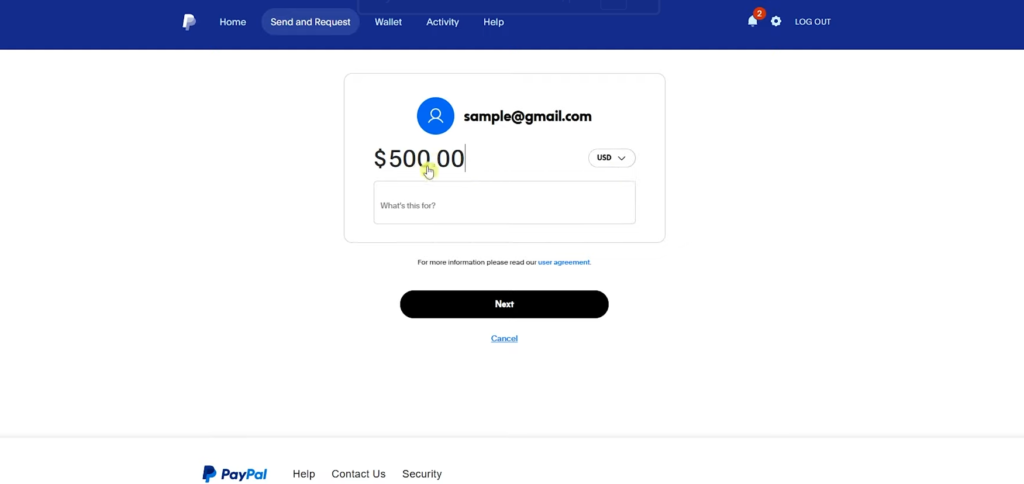
- Log in to your PayPal account on the website or in the app, then open Send & Request.
- Enter the recipient’s details. You can use their name, username, email, or mobile number. If you’ve sent money to them before, the name or username can be easy to spot. If you haven’t, email is the safer choice.
If you’re not fully sure which account is theirs, use the email address instead of guessing from a similar name.
- Enter the amount you want to send. You can also change the currency before moving on. If you’re sending in a different currency than the one in your balance, PayPal shows the conversion, including how much you’re sending and how much the recipient should receive.
- Add a note if you want. This part is optional, so you can leave it blank if there’s nothing to explain.
- Hit Next and choose the payment type. This is where people pause, and for good reason.
Choose the right payment type before you send
This choice matters more than it looks:
If you’re paying someone for a service or product, choose Goods and Services. If you’re sending money to a friend or relative, Friends and Family fits better. The tradeoff is simple, Friends and Family does not include buyer protection, so you usually wouldn’t use it for a purchase.
After that, pick how you want to pay. You can use your PayPal balance, cards, or other payment methods already connected to your account. That’s also part of how to use PayPal without bank account, because a linked bank isn’t the only funding option shown during checkout.
Once you review everything and send it, the transfer is typically processed right away because it’s PayPal to PayPal.
A few things people mix up with this process
This guide is about how to send money from PayPal to PayPal account, not how to withdraw money from PayPal to bank account. That’s a different path inside your account.
If you need a PayPal to bank account transfer, PayPal’s official withdrawal instructions show the bank route through Wallet and Transfer Money. That’s the process for how to transfer money from PayPal to bank account, or transfer money from PayPal to bank account after you’ve received funds.
The short version is this: a PayPal guide for sending money to another person starts in Send & Request, while a PayPal to bank account move starts in Wallet. Once you know the difference, how to use PayPal gets a lot less confusing.
Final thoughts
If you want the fastest answer to how to send money on PayPal, open Send & Request, enter the right recipient, check the amount and currency, then choose the payment type carefully.
That’s the part most people rush, and it’s the part you shouldn’t. Get that right, pick your funding method, and your PayPal to PayPal transfer should be on its way almost instantly.
Prefer Visual Help? Watch the Step-by-Step Video Guide!
Struggling with How to Transfer Money From PayPal to PayPal? Don’t worry—this video breaks it down step by step with clear, hands-on instructions. If you want the only working method that actually gets results, this video is for you!
▶ Watch TutorialFrequently Asked Questions
Want to learn How to Apply for PayPal Credit Card? Here’s a Step-by-Step Guide Article on how to do so.